Bondora announced today (28 april 2017) the launch of a new automation feature: recurring payments.
How to set up your recurring payment
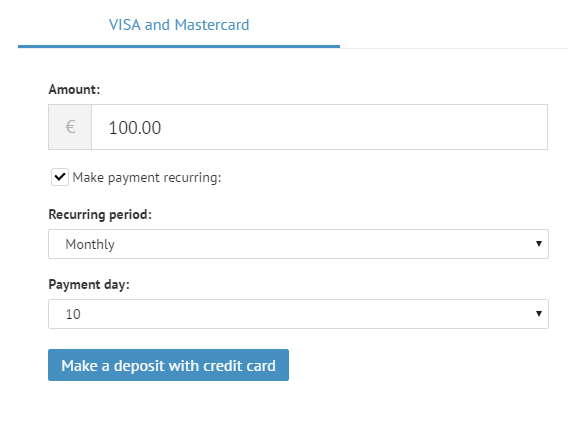
They added a simple new feature which allows you to set up recurring payments from your bank to your Bondora investment account. When you login to your Bondora account, go to the “Add Funds” tab on your Dashboard. Below you’ll notice a checkbox for “Make payment recurring.”
With this checkbox selected, setting up a recurring payment is as easy as making a regular credit or debit card payment.
- Choose the deposit amount.
- Choose a period for the recurring payment.
- Choose a payment day.
- Click on “Make a deposit with credit card”.
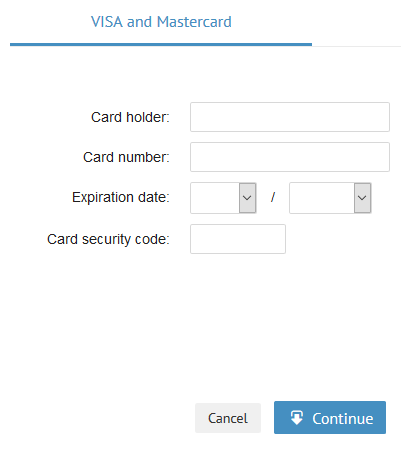
After that you are asked to provide your card details and authenticate the payment.
Automation makes it easy to contribute even small amounts. Over time the account grows from your regular contributions and your compounded returns. Even small weekly amounts can make a big difference.
Get new articles by email
Ex-dividend dates, earnings previews and P2P platform changes, straight to your inbox. Unsubscribe anytime.
Disclaimer: This article is for informational purposes only and does not constitute investment advice. Investing involves risk, including the possible loss of capital — always check current terms directly on the platform before investing. This article may contain affiliate links; if you sign up through them, we may earn a commission at no extra cost to you.